T/C Car
Process and Rationale
Process and Rationale
- capture live video as bitmapdata
- flip the image
- change the image to gray scale mode
- draw out the difference pixels between the current frame and the last frame
- the result image would be the moving objects
- filter out the dark area (dark grey color) to pure black color
- filter out the bright area (light grey color ) to pure white
- the drawing tool (the brightest spot) becomes a white dot in the result image whenever it has motion.
- if the white dot move over a button, the function of the button is triggered
- there are 3 buttons as below:
- a. Record: record the x, y value of the drawing tool for 5 seconds
- b. Stop: stop the recording
- c. Play: playback the x, y value and control the position of servo A and servo B
The control method as below:
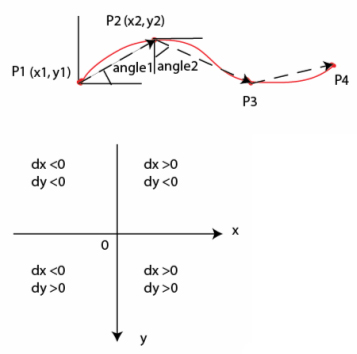
dx = x2-x1
dy = y2-y1
angle1 = atan(dy/dx)*180/PI
if ((dx>0 && dy< 0) || (dx<0 && dy<0)) => the car turn left
if ((dx>0 && dy>0) || (dx<0 && dy>0)) => the car turn right
other conditions, the car goes straight
Currently the sample rate is calculate the dx and dy value once for every 3 records.
Problem encountered!
From the software point of view, it is better to have the speed control as well as the wheel rotation angle control. Unfortunately, the RC car is too cheap to have all those options. In addition, the car has a mechanical problem on the wheel turning. Therefore, currently the driving path of the car is not fully match with the drawing path. The result can be improved once the cheap car is replaced with a more robust one.